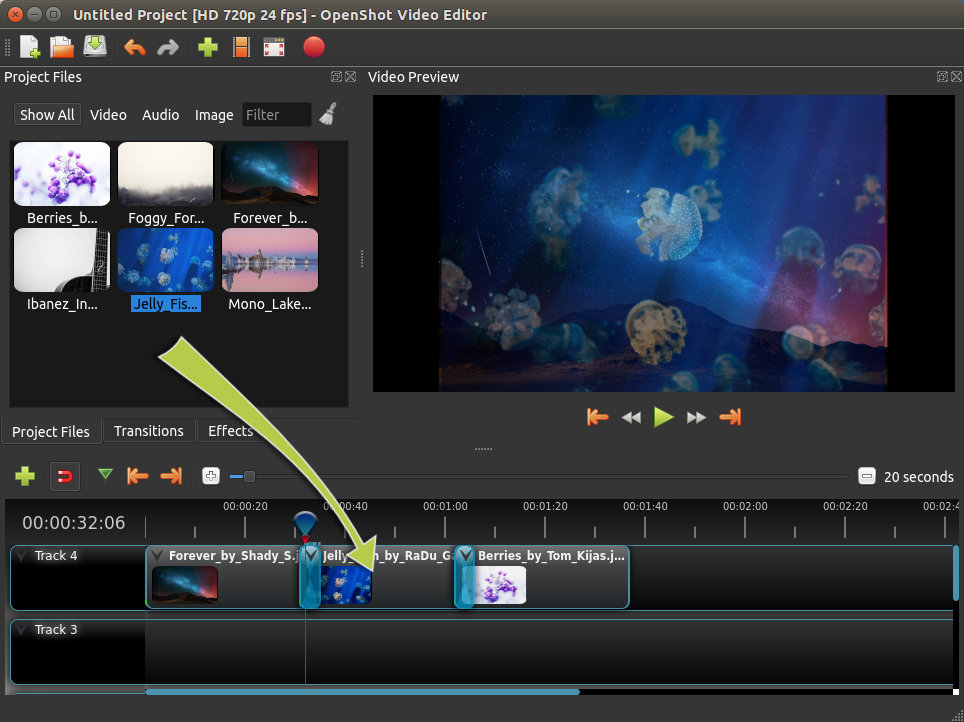



| Version | Change log |
| OpenShot Video Editor 3.5.0 Mar 21, 2026 |
Highlights & Features: New default timeline: The new QWidget timeline is now the default, with much smoother zooming, scrolling, dragging, trimming, snapping, and multi-clip editing, especially on larger projects. New keyframe panel and major timeline polish: The keyframe panel is now part of the default editing experience, with smoother dragging, better selection behavior, improved snapping, high-DPI thumbnails, live trim feedback, and many workflow refinements. Smaller export file-sizes: Export presets were improved for smaller files and better quality, Blender GPU rendering is now enabled by default for Animated Titles, and hardware decoding checks are more reliable and user-friendly. Experimental ComfyUI integration for advanced AI workflows: OpenShot 3.5 adds a major first pass at ComfyUI integration, including generation workflows, tracking and segmentation tools, custom JSON workflows, progress reporting, and better remote-server handling. Improved stability, testing: This release includes expanded unit tests, new UI and replay-based testing tools, better missing-file dialogs, improved autosave and packaging reliability, smoother project loading, and a long list of bug fixes across the app. openshot-qt Changelog (Version: 3.5.0): 27a3af7 2026-03-18 Jonathan Thomas Packaging libsndfile in AppImage, to prevent some audio issues on systems with incompatible system libsndfile libraries HEAD, origin/release-20260316 09267c3 2026-03-18 Jonathan Thomas Fixing small regression failure in our new unit tests (on Linux gitlab runner) b32bfea 2026-03-18 Jonathan Thomas Making qwidget keyframe dragging silky smooth, and fixing issue with disappearing partial thumbnails during trimming. b45b052 2026-03-18 Jonathan Thomas Fixing a bunch of qwidget clip and thumbnailing issues: - trimming of re-timed clips - thumbnailing system big refactor, use time keyframes, and volume keyframes - lots of new unit tests around thumbnailing and clip sizes - new squash/stretch thumbnail beh |
| OpenShot Video Editor 3.4.0 Dec 16, 2025 |
New Crop workflow with interactive crop handles + crop context menu (keeps crop/transform behavior in sync) New Timing mode toggle for quick drag-to-retime editing (plus better real-time preview during retime) Draggable keyframes (timeline drag + improved keyframe panel) with better snapping/precision to the FPS grid Big upgrades to the Experimental QWidget Timeline (faster scrolling/zooming, improved snapping, markers, thumbnails, waveforms, fewer freezes) Multi-selection editing across clips/effects (property dock + transform handles + safer undo/redo) Faster exports with VideoCacheThread integration + smarter bitrate for “All Formats” New/expanded effects & creative tools: LUT Color Map, Lens Flare, Sharpen, Outline, Spherical/360 tools (plus updated docs/icons) Improved import/export interoperability (Final Cut Pro XML + EDL updates, better keyframe support, more standards-aligned timecode) AppImage + distro compatibility improvements (Ubuntu/Snap/Flatpak handling, Arch/Manjaro fixes, Blender 5.0 animated title compatibility) Updated translations & credits (many new/updated languages, refreshed supporters/donor lists, faster credits/about filtering) |
| OpenShot Video Editor 3.2.0 Jun 25, 2024 |
Highlights & Features: Large Theme & User Experience refactor (Added new Retro & Cosmic Dusk theme) Improved Timeline Snapping and behaviors New Remove Gap feature (to remove unwanted gaps between clips) Improved Split Clip and Preview dialog functionality New Playhead and Marker icons (for all themes) Support for Blender 4.1, and improved Blender animations Use friendly name on timeline (i.e. when split clip or updating file names) Improved Undo / Redo functionality (better transaction support, more stable) Improved high DPI display support Improved Tracker / Object Detection effects (more features, more stable) Improved Parent property (for use with Tracker / Object Detection effects) Improved Property Editor functionality Improved font handling in Title editor (for AppImage) Added new Not Found thumbnail image for missing or corrupt files Updated scale x and y limits in property dialog (to prevent crashes due to large numbers) Updated Help Menu Icons with new Discord option |
Total downloads
86
Last month's downloads
2
Last week's downloads
2

Neat Video for After Effects x64, developed by ABSoft, is a top-tier software ... Download Club. This software is a must-have for video professionals and enthusiasts alike. It is a digital ... to reduce visible noise and grain in digital video footage produced by digital video cameras, camcorders, TV-tuners, ...


... Club is thrilled to introduce you to Movavi Video Editor – a versatile software product created by Movavi LTD. This video editing tool caters to both beginner and professional video editors, with its easy-to-use interface and advanced editing features. Movavi Video Editor offers a wide array of editing options, ...


Top Download Club is proud to present the Audio Video Synchronizer, a game-changing software developed by CHENGDU WEISHU ... issues that often plague multimedia enthusiasts. With the Audio Video Synchronizer, you can easily adjust the timing of audio and video files so that they are perfectly ...