



| Version | Change log |
| Photomatix Pro 7.1.4 Feb 20, 2026 |
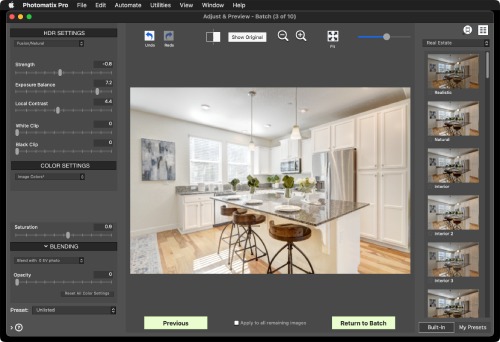
Main updates in v7.1: Customization option: Three modes available to customize Photomatix Pro for your use ('Landscape Photography', 'Real Estate Photography' and 'Photogrammetry'). HDR Inspector tools: The HDR Inspector panel adds controls to adjust the exposure and zoom factor of a 32-bit HDR image opened in Photomatix Pro. It also allows you to draw a selection on the 32-bit HDR image in order to visualise it at original resolution with an adjusted brightness, with the option to copy it to the clipboard. Lens selection in batch mode: The 'Merge Options' panel of the Batch Bracketed Photos adds an option to select the lens that will be used by the lens correction. Resize to smallest alignment crop: The 'Naming & Resizing' panel of the Batch Bracketed Photos adds an option to apply the smallest alignment crop to all aligned images. The HDR Histogram has been improved and made accessible from the HDR Inspector. Other updates in v7.1: Bug fix: When using the Batch Preview feature with Raw files, the preview was often brighter than it should with presets or setting from Tone Mapping methods. Bug fix: The Open Photo dialog was crashing if the previous path used to load photos didn't exist anymore. Bug fix: When loading Raw images, the 'Merge to HDR Options' window didn't always display the drown-down menu to select a lens. Bug fix: Potential fix for a crash with the Brush Tool involving an 'ArgumentOutOfRangeException' error that had been reported by some users. |
| Photomatix Pro 7.1.1 Sep 20, 2023 |
Customization option: Three modes available to customize Photomatix Pro for your use ('Landscape Photography', 'Real Estate Photography' and 'Photogrammetry'). HDR Inspector tools: The HDR Inspector panel adds controls to adjust the exposure and zoom factor of a 32-bit HDR image opened in Photomatix Pro. It also allows you to draw a selection on the 32-bit HDR image in order to visualise it at original resolution with an adjusted brightness, with the option to copy it to the clipboard. Lens selection in batch mode: The 'Merge Options' panel of the Batch Bracketed Photos adds an option to select the lens that will be used by the lens correction. Resize to smallest alignment crop: The 'Naming & Resizing' panel of the Batch Bracketed Photos adds an option to apply the smallest alignment crop to all aligned images. The HDR Histogram has been improved and made accessible from the HDR Inspector. |
| Photomatix Pro 7.0.1 Sep 18, 2023 |
Support for Raw files from Nikon Z9 and Sony Alpha 7 IV. Bug fix: Issue displaying DNG images in portrait mode generated by DXO labs. Bug fix: HDR viewer not showing when displaying 32-bit HDR image after a merge. Bug fix: HDR viewer image showing incorrectly under certain scaling modes. |
Total downloads
51
Last month's downloads
0
Last week's downloads
0

Top Download Club is thrilled to feature Photomatix Pro, the award-winning photography software from MultimediaPhoto. Designed for professional photographers, this 64-bit version of Photomatix Pro enhances every image with striking dynamic range and ... images, and generating panoramic shots. We love how Photomatix Pro elevates any photo to a work of ...