



| Version | Change log |
| The Bat! Home Edition 12.0.3 Mar 11, 2026 |
New component for message print preview Syntax highlighting for previews of attached text files (.ini, .md, .html, .xml) in Conversation Thread View Improvements to the interface customization dialog (search and drag-and-drop support) Error messages appeared when trying to preview .xlsx files Icons in the "Options" menu in the Editor were not highlighted when active Certain strings in the Address History were truncated Improper initial display of iCalendar (.ics) file contents led to incorrect import of events into the Calendar .mbox export/import did not preserve the received time Message list tabs were comparatively smaller on 4K monitors |
| The Bat! Home Edition 12.0.2 Jan 21, 2026 |
Improvements: Added missing translations on the header pane in the Conversation View Fixes: Tags' and color groups' colors were missing in the context menu Certain national characters were not properly displayed in the Conversation View Font size settings for Source Viewer in "Preferences" were not applied in the "View Message Source" window Resolved an issue that caused unintended font size changes in the classic message preview and the plain text editor after opening the "View Message Source" window Further fixes to the font size issues related to the message source viewer SmartUpgrade works from the "HelpEnter Registration Code" menu correctly now. If you access that menu in The Bat! v12 and insert a v11 key which is eligible for a free upgrade of the license to v12, then the system will automatically process it, issue a new key for v12 and register the software Resolved an issue that caused the message body context menu to appear offset from the mouse cursor |
| The Bat! Home Edition 12.0.0 Dec 31, 2025 |
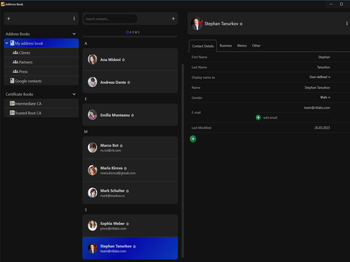
New features: New Compact mode in the Conversation View Option to hide recipients in Compact mode of the Conversation View Support for rich text actions for quick reply editor in the Conversation View DNS service autodiscovery data can now be used for account creation Improvements: Major UI updates in the new design of the Address book Interface improvements changes in the Conversation View Fixes: Fixed an issue that caused a crash when attempting to drag and drop contacts between address books Fixed an issue where “Save photo” button in the photo selection dialog was outside the clickable area |
Total downloads
56
Last month's downloads
3
Last week's downloads
1

... Download Club is proud to introduce one of the most reliable email clients you’ll ever come across. The Bat! Professional Edition, developed by Ritlabs, is an all-in-one solution for managing emails, contacts, and calendar events with remarkable ease. The Bat! ... system that ensures maximum security for your privacy. The powerful search function allows you to quickly find ...


... Club is proud to introduce "The Bat! Voyager", the ultimate email client solution developed by Ritlabs SRL, perfect for users in need of a portable and secure email client software. This amazing software offers an unparalleled level ... with an advanced encryption system that ensures your emails are safe from unwanted eyes. Furthermore, its user-friendly ...

... is proud to feature "The Bat!", a top-tier email client developed by Ritlabs, SRL. Designed with advanced features for power users, ... accounts and integrated templates for composing messages, managing email has never been easier. The intuitive interface is simple to navigate and the ...